
This is driving me insane. Please help!
You hold the Function (FN) button or the AltGR button and then the labeled buttons you want.
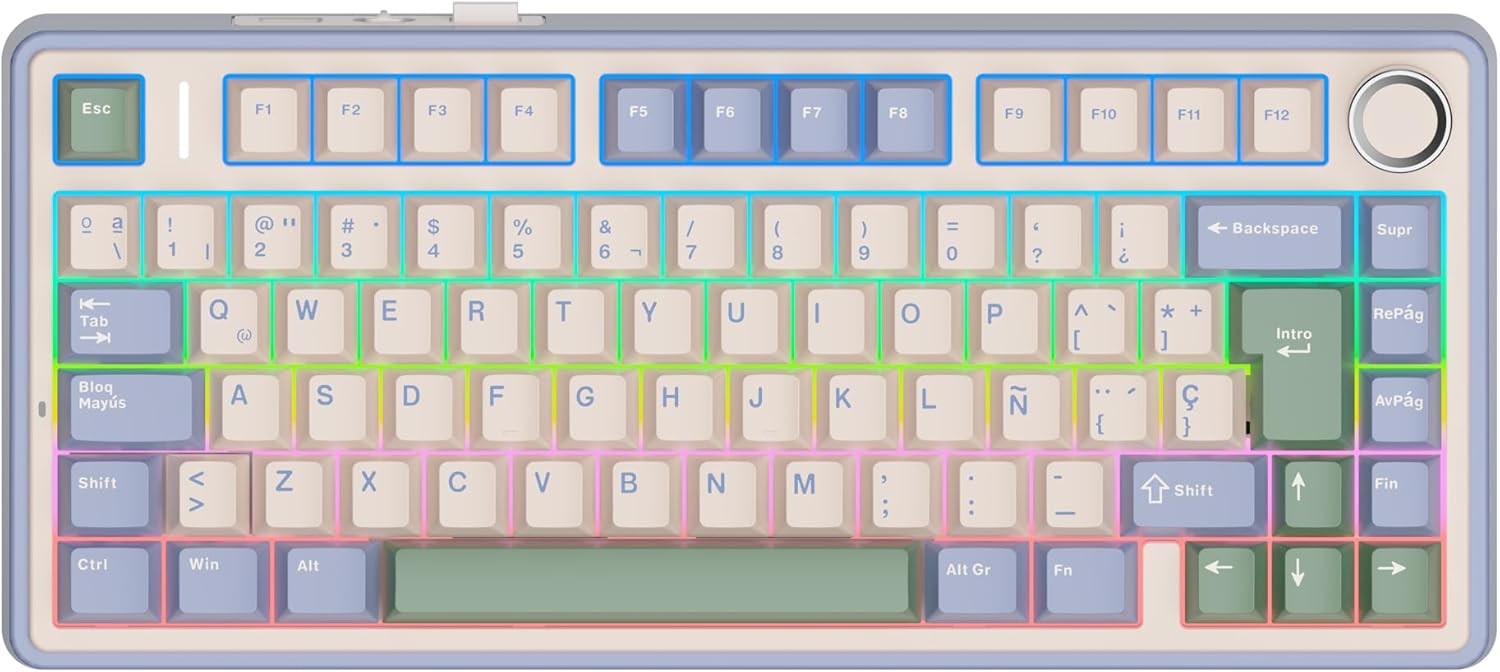
If the pictured keyboard is the one you’re using: It looks like it doesn’t have a Print Screen button. It’s not a full size keyboard.
That’s a weird layout, it doesn’t seem a proper Spanish (Spain) layout.
The apostrophe is the button right to the 0, but on the image it seems that is shift+?
The symbols on 1 are correct, but on 2 and 3 seems swapped, like for @ and # is shift+2/3 but in Spain it is AltGr+2/3
EDIT
Definitely OP’s image keyboard is not from Europe, it lacks the € symbol printed on the E.

Use the AltGr key!
AltGr is a key on ISO keyboard, it means Alternative Graphic, and when you hold it and press either [ or { you should get the correct glyph.
Note that you won’t see it at first, it waits for the next character and will modify it to include the change, or insert it in front of the next character if the character does not use modifiers.
You can press space after triggering the glyph to just print it separately.
Useless info: The backtick (`), forward tick (´), and apostrophe (') are distinct characters.