Can’t make the wrong people look bad.
That reminds me of a recent situation.
As someone working in software development, we are required to take part in the security trainings, the usual “don’t open things from people you don’t know” and “verify that a link is ‘known’ even if you get something from a person you do know”, yada yada. You know the drill.
Recently, I got an email from our Boss saying something about “Here is something that you need to click on so that you are being authorised to do this stuff”. Here was my thought process:
- This is from the boss’s Email. But this cannot be trusted since it can be faked
- This is about something we/our software can do. But I don’t know why I have to do this, since this isn’t really something I am part of or even know anything about
- It looks like a legit email
- I hovered over the link, which had some weird target location that I didn’t know
So, as a good boy, I opened a new Support ticket on IT with a screenshot of the link and said: “Got an email that tells me that I should open this link, but I don’t know this link. What should I do?”. The response was simple: Mark as Phishing and delete the Mail, done.
2 hours later, I got a message on Teams from IT which said: “Well, apparently that mail you marked as phishing was actually from us (was legit)”. Great. Mail is gone now, don’t know where Outlook put it, and frankly, I don’t care.
If you train your people to “question everything” and not open links they don’t know where they are going, then don’t use some idiotic “middle man” or referer links in your official emails either. Even better, announce things before sending something out. I don’t know how many emails I have gotten over the years where I would question the content and ignore it only for it to be something more important that nobody felt the need to announce first that something like this is coming our way.
I had a previous company send out a company wide announcement from a sketchy sender with a weird file attachment(apparently it’s a voice mail file format), and the email was essentially listen to this attachment with no signature or anything else. They had to send out a second email explaining the suspicious email is actually real. Companies seem intent on ensuring there is minimal difference between phishing and legitimate email.
Honestly, this is preferable, and pretty funny. IT can always resend invites to tools and services. I’d rather send 1000 of those than have to lock someone out and have to talk to a human.
I already know the way to get me to click a phishing link is to send me 5 emails from the same company all 100% legit but have the unsubscribe link be the phishing link.
I would fall for that because I’m unsubscribing from companies emails all the time.
Of course now I’ve admitted this I’ll be avoiding the unsubscribe link for a while too.
Even IT people click on random unsubscribes? I’ve learned that the hard way in my teens, that you only get more spam then. Only unsub from sites you know you have an account on.
Random? No I think my original message misses a point.
I don’t look at ads. I don’t respond to messages I don’t answer phone calls from anyone besides my wife.
I’m so overly cautious and uninterested I could possibly miss a call telling me my parents are dying.
I’ve been in IT so long that everything these days is spam to me, I’m always looking for a way to disable every notification and block every call/message.
The last time I had a real social media message that I cared about was back when MSN messenger existed… So at least 18+ years ago
Now don’t get me wrong, I’m a ridiculous human being… I am a big fat loudmouth but even as far back as Bebo then Myspace then Facebook I’ve been more interested in getting attention face to face.
Now I’ve gone on and on… That’s because I’m in my late 30s and I hate my job and I’ve drank too much alcohol.
Good luck to you and I wish you well
So would you be clicking subscribe link???
Heavens no
If IT did the phishing tests nobody would stand a chance lol
I’d always pass because I never look at any of my emails. Checkmate, IT department
I’ve setup a filter based on email headers that include ‘Phishing_Training’ lol, can’t be asked
Same but xphish, however these emails aren’t sent like normal emails so I have to run the rule any time I come back from a holiday so I can quickly identify them quicker lol.
Work in IT and my old cyber security architect would always try to get us. He did some great tricks and got a few salesmen. Never the engineers. Then they did similar tests for clients, they got hammered bad.
Purple link, lol
Devious
Me and some coworkers got yelled for reporting the phishing attempt. And then still clicking on the links. The halfass made up sites it took you to were worth it. It’s wouldnt take you to some site saying you failed. It would be like a lunch menu for some made up place. It was great.
They got me with one a few weeks ago :(
I fell for a fucking obvious pathetic text when I moved to a new country because my bullshit immune system had not adapted to the new landscape.
It’s FUN to turn over all of your bank cards after a month!
Oh dang. I just had to watch an IT security/phishing training video
By the way, did you already donate for the annual November nothing day celebration? Click this 🔗 to donate, everyone is doing it!

Report the email for phishing attempt.
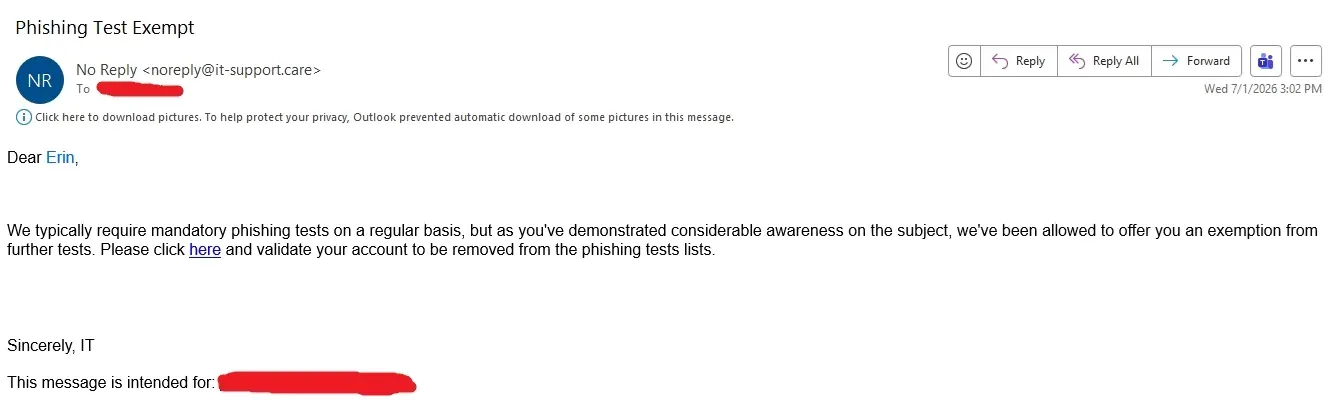
Uhm. It is the phishing attempt. If you click that link it will tell you, you failed the test. And looking at the comments, a lot of people would fail this test.
… That’s why you would report the email as a phishing attempt.
I was maybe just reading the top comment differently, as if they thought the e-mail was legit and now jokingly said to report it, because reporting a legit e-mail about the topic phishing is ironic.
I got ya. But picture an IT department noticing that you just do soooo well on your phishing tests that they’re willing to opt you out of training and testing. Because you’re special. And you have to click an email link to make it happen. Because the IT department couldn’t remove you from testing on their own.
If you can’t recognize that email as an obvious phishing attempt, may God have mercy on your online soul.
if this was reddit it would look a lot different, as everybody knows, you need a really high iq to use reddit
I would
You wouldn’t download a car
My company: Don’t click on suspicious links.
Also my company: It’s employee survey time, click this link to complete the survey http://surveywhale.com/haidn39fk49cmc93mx
I mark them as phishing attempts every damn time.
My company used some security software that scrambled up every url in emails.
You could’ve spotted their fake meeting invite if only it would have shown its true url.
Heh, an employee at my work got an email saying his anti-malware was failing to update, and to run http://10.3.4.2/xbejdjr.exe and that they need to click allow when the browser warns them that it is rejected, then right click, run as administrator, and they need to click allow in two other places to let it run.
So he reported as phishing, then IT contacted his manager saying he was failing to help IT run a required update, it was evidently totally legit, but just the most scammy looking way they imagined.
They can send executable links through emails and get their pants in a twist when the users do the right thing and report it for being shady AF, but they can’t use RMM to automatically install their updates? Bullshit IT department needs to be fully replaced.
10.0.0.0/8 is a reserved lan name space, so I’d probably have ran it after confirming the headers (anything 10.x.x.x will be on your local network) but I do agree, shady and stupid af especially since IT presumably should be running their own dns and it’s trivial to implement a redirect to an internal corporate tld.
I would have assumed a beach head where they compromised a system on the internal network and then phished to extend the reach.
I figured IT of all people would have allocated some DNS and some certificate. I would have taken the lack of TLS and DNS as a consequence of an attacker not having enough access to make those things a reality, and banking on people viewing 10. as safely internal like you are inclined to suggest.
Just because it has an internal address does not mean it is safe, particularly as number of employees goes up and any one of them can get a system under their control compromised.
I never said it was safe, I said it was internal. If it’s on 10.x.x.x, sent with email headers verified against my orgs Auth, it’s beyond my or any normal user’s pay grade to deal with it and should’ve been caught far far before this point by design. Though, what you’re saying does align with defense in depth principals, I think you’ll find they cannot be expected in real life use, but perhaps you’re the type to independently verify every file you interact with via hash. Idk, some people on lemmy go hard. 🤷♂️
If that was legitimately IT, then that whole department either need the funds to acquire some remote management software, or they all need to be axed. Only the budget will tell.
It’s the latter. They actually get thrown all sorts of money in part because they say they need tools. The standard corporate load has at least 3 patch management software suites, two ‘cybersecurity monitoring solutions’, three anti-malware software products.
Sometimes their automation fails and this was one of those situations where his and at least in our department only his where their automation failed for some reason or another. So they fall back to a sketchy looking exe on some random web server they don’t even bother to enable https on (they also provision root CAs, so it’s not like it would be a challenge for them to have https on an internal domain).
They aren’t very good, but they are doing things perfectly right; so long as the one deciding what is right is the sales reps of the software they use.
That is so fucking sketchy, I’d have to talk to the IT guy myself or get on a video call to make sure their email or the group chat or whatever wasn’t compromised.
is it tho? that’s a LAN IP, so just a file on the company’s network. browsers whine about http by default bc its security over WAN. then windows just whines about everything
Yes. An average employee doesn’t know the difference between public and private IP’s
well of course. just meant the IT guy didnt necessarily do anything sketchy or wrong, just a consequence of all those modern security prompts. totally get why folk would be apprehensive seeing that, deal with it all the time. but i’ve also never seen a company where they have an SSL cert for the LAN or something either, it just gets explained
I think teaching nontechnical employees that its okay to enter an IP address they don’t know, given to them by a remote person and bypassing security prompts would qualify as “wrong”.
by explain, i didn’t mean teach everyone it’s always okay to ignore security prompts. maybe that’s just how the cookie crumbled as the fix but it should’ve been explained why it’s being done that time, that’s where I think they’re wrong, I rescind that. you’re right that especially remotely it’ll create bad habits.
IME IT just walked our asses over when it’s something like that, never worked in a giant office, so that’s where I spoke from, ya feel me
Please use this link to ensure your security is up to date.
If you told users those are internal and to use them they will quickly forget to verify the link as they were told previously to click on them anyways.
User: I was told links with numbers are OK so I clicked on https://184.147.69.420.ru/spicy.exe, it even said https too!
Lol. That’s not sketchy at all. /s
I tried to make the case to IT that hyperlinks are not a threat vector on their own. They should train against opening attachments and entering credentials once the link is clicked. I haven’t heard back yet, I’m not sure they liked my message. But they did send a message letting us all know that reporting non-phishing surveys wastes their time.
Unfortunately, theres very good statistics that show 1-click attacks are quite common beyond just phishing for login creds. Granted, not nearly as common as the latter, it’s still a moat you had to dig :(
The argument regarding hyperlinks is generally that there are 1-2 click zero-day vulnerabilities pretty frequently, so clicking a hyperlink will take you to a server controlled by the attacker which may or may not employ one of those. Additionally there’s a constantly rotating array of obscure HTML/CSS hacks to trick even the savviest of users into thinking an attacker controlled window is something else or otherwise compromise a users system without utilizing zero-days. And finally good ol’ social engineering typically relies on several vectors at once, so by the time someone’s clicked the link there’s a good chance they might go further for the attacker before they clue in.
So yeah, theoretically if everything was as it should be, clicking the hyperlink and downloading and executing literal malware wouldn’t work, but security is about trying to make sure the weak points of every part of the chain don’t line up, because when those holes in all of the layers of security line up, you’ve got a nice big compromise to clean up, and those buggers are like bedbugs, once they get in, you can be chasing them for months or years until you’re finally rid of them
The web is very locked down already. People click so many links from email, but also outside of email. Clicking a hyperlink in an email is not a threat vector. If it was, we can’t vote on when to meet, open shared documents, or basically do anything other than plaintext email. Aha! That’s the solution. Plaintext email - all attachments and HTML are blocked.
Do we work in the same company?
You work for GSK don’t you
100% success rate if you mark every email as a phishing attempt.
They don’t track false positives?
In my vast IT experience? No.
I take great pleasure in flagging the training emails from my company’s IT contractor as phishing emails. After all, they’re unexpected emails with big link that I simply must quickly click on. That sounds like phishing to me!
I’ve genuinely done this once or twice as it really looked like phishing to me. External email, big red button, hey, you have to finish this training until date xy!
Yeah, no, fuck you, report as phishing.
Whoops (:
Ideally it should simply be a friendly reply back of “hey thank you for your concern but BrainBlstrz is a legitimate company that we partner with, you can retrieve the email by [steps] if still you need it” but not everyone can be so reasonable about such things
Those should be validated external senders and links, else they are spam or phishing by default.
I used to report just about any email I got from HR/IT/Executive Management that had a link as spam… I got a lot of interesting replies from IT over the years.
Time to update your benefits SPAM/PHISHING!
Sign up for the holiday “pot luck” SPAM/PHISHING!
Tells us how you feel in thie “anonymous” survey… you guessed it SPAM/PHISHING!
Good systems will separate and tag verified internal from external communication so spoofing isn’t a thing. As well they should validate links to internal sites as safe. At least then they don’t get these types of reports.
IT guy here…
DAMN, that was brilliant!
Same. I saved it to add to our KnowBe4 templates