
Homeplugs (ethernet over power) are fine for some things, but they add so much latency to the network.
Wired is so much better.
You must log in or # to comment.
The only thing they are good at doing is producing loads of RFI and pissing off every ham radio operator in the area.
One of the best no-noise locations I ever did was in a fully powered-down sailboat in the southern lagoon at Fort Jefferson, Dry Tortugas. Leaky consumer electronics are the worst.
To contrast, I managed to work Indonesia from Alamogordo NM despite being in a residential neighborhood, HVAC capacitors and foreign over-the-horizon-radar (OTHR) be damned. Taught me a lot about being patient and picking out transmissions in the noise.
I mean does anyone go for power line adapters as their first choice when straight up ethernet is an option?
The number of people that are anti wires, but also want WiFi signals everywhere is too high.
Powerline is so leaky it is basically wireless with wires. 14x3 is not a transmission line, but it does effectively turn your whole home electrical system into both a transmitting and receiving antenna that just happens to talk to it’s self. It’s an engineering nightmare.
I use them to extend my network from my 3rd story apartment to my garage. Wireless doesn’t reach, pulling a cable would be very difficult and expensive.
Yeah there are use cases
I want wires everywhere I don’t care fuck wireless signals give me wired headphones, controllers, networks
Me and my homies hate antennas
i like the idea of wired headphones, but in practice they’re kind of annoying
I imagine your home looking like the set of a Terry Gilliam film lol
I would not, but we had a working system so moving things about should have been fine. I think running over 2 consumer units adds to the latency
Me, i’m still sorting the basement before i run RJ through it
In much of the world most houses will have existing electrical wiring but no network cabling.
Sure, but then the question is “can you install network cabling?” If yes, then do that. Even without the interference bit, power line adapters are so finicky and unreliable that they shouldn’t really be your go-to solution anyway
I think that the answer to “can you install network cabling” is mostly “no”. That’s why mesh networks are so popular these days.
Yeah but between power line and ethernet, it’s not a 1:1 comparison. If you can have ethernet you’ll likely install ethernet. Power line fills a need for ethernet-like internet when you can’t wire the place up.
Yes, we all know that. That’s what we’re telling you. Nobody is installing power line if running Ethernet is simple.
You seem to be expressing shock that people would choose powerline adapters as their first choice. People are replying to tell you that it’s not their first choice, but they chose it anyway because running Ethernet is often way too difficult.
Nobody is installing power line if running Ethernet is simple.
Not sure why you’re adding any more, you’re literally agreeing with my comment, but sure, act like my comment was about future replies, and not the op.
Read the thread, and then ask yourself the question you just asked me.
As a network guy: Ethernet over power lines can be fine, but you basically need to be an electrician, and have a working knowledge of how powerline Ethernet works before you can get there.
Even if you do, or stumble into a working setup by accident, you can absolutely end up with all kinds of bad things happening because power lines are notoriously bad with crosstalk and EMI, both on the wire and emitted from it.
If you absolutely cannot do rj45/Ethernet runs, and WiFi isn’t viable for whatever reason (or even if it is), look into MoCA. Thank me later.
It won’t cost you any more than powerline, and you’ll get a cleaner signal, more consistent performance, and overall a better experience.
In order of preference, I prefer the following connection options:
- fiber
- Ethernet
- MoCA
- Wi-Fi
- powerline
Fiber, not because it’s faster or better (there are many ways it’s actually worse than Ethernet), but because it’s almost impossible to interfere with, unless someone physically disconnects the cable (or breaks/cuts it). As long as the line is protected from damage, it will give the most consistent performance.
Ethernet, more robust than fiber in terms of physical disability, can be faster at propagating data (the time it takes to get from one end of the cable to the other), but only works over relatively short runs (100m or less, by spec), and it’s susceptible to alien interference and crosstalk. However, it is far more rugged than fiber.
MoCA is half duplex but shares a lot of the benefits of Ethernet. The main improvement here is that coax is commonly present in most homes already, while Ethernet is relatively uncommon in homes, so many homes are already wired in a way that works with MoCA.
Wi-Fi is also half duplex, it can go faster than Ethernet under the right conditions (which are almost impossible to achieve in real world conditions). Propagation is as fast as Ethernet but it has more overhead, and it is much more prone to interference from other Wi-Fi networks or other things operating on the same, unlicensed, bands.
Powerline should only be considered if all of the other options are disqualified for some reason.
Also, anyone using wifi extenders (not talking about mesh or anything, just actual Wi-Fi extenders), should probably not be doing that. Wi-Fi extenders are often just retransmitting the packets on the same wifi channel, which dramatically cuts the available bandwidth. You’ll end up with a stronger connection, but a much slower one.
Thank you for coming to my Ted talk.
+1 for MoCA
I switched from powerline to MoCA about 10 years ago, and it was a huge step up. Even though it’s half duplex, since MoCA version 2.5, there is enough total bandwidth available to sustain 1 Gbps in 2 directions simultaneously, so it is functionally almost equivalent to full duplex 1 gig Ethernet (except for few ms of extra latency)
https://en.m.wikipedia.org/wiki/Multimedia_over_Coax_Alliance
Similar idea to powerline adapters, except over coax lines instead.
You’re quick.
Thanks for the assist. This is what I’m referring to.
Just to add that proper mesh systems are distinct from extenders as they will use separate mesh channels for back haul. They also have the “travel AP” things which act as extenders but form a new network on a different channel. You can actually do this with many Android phones as well.
My experience has been different. Wifi extenders were not very reliable. Wifi devices were better, but powerline extenders have been rock solid. Ping times are right in line with wired Ethernet too.
In my experience powerline extenders are a reasonable alternative to Ethernet for home users in places where running a cable isn’t an option.
Alien interference? What does that term mean here, or are you joking? I’ve not come across this in networking before.
Alien meaning “external”.
Electrical interference can come from all kinds of places, near and far. I guess technically you might get interference from other planets but I don’t think that’s what they meant. :) Solar flares are a possibility, though.
Alien can be boiled down to simply meaning “foreign”. As in, not coming from the wire bundle that is used for the connection.
Crosstalk is the term usually used for interference coming from other pairs in the same bundle, which should be minimal due to the electrical/magnetic properties associated with twisted pair.
Alien interference is any inference from an outside source, usually by inducing a current on the Ethernet pairs, that shouldn’t be present. Usually this results in corruption of the data in transit or a failure to sync (and establish a connection at all).
No extra terrestrial interference was meant to be implied; though, I’m not excluding the extra terrestrials from creating interference; I’m sure if such beings exist and are here, they could interfere, but that wasn’t the intention of my statement.
Alien inference is a very common term in wireline networking. I’m surprised you haven’t heard it.
I would say that WiFi is wonderful for those last few meters. A room with a wifi AP literally visible can perform fantastically for several devices in that room. It’s just that back-haul connection across the building back to the modem where WiFi should be down on the list like that. I keep seeing these “mesh” wifi access points that use 6ghz back-haul and shake my head. Better than just having a single access point, but probably asking for pain in most circumstances.
I have 3 access points in my house, where there’s no place where the signal has to go through more than 1 wall. They are fed via gigabit Ethernet back to the modem which acts as a 4th access point. That could be MoCA, and probably will eventually be fiber, but neither WiFi nor powerline would be fun for that. Wifi does short range great, whereas powerline is just a bad idea from the start.
+1 for fiber. Also because there are really thin fiber cables available (like <1mm in diameter) and with a bidirectional transceiver you can literally run a cable in the corner of two walls and hide it with just some acrylic compound and paint.
I would agree with that, but here in the UK we dont have coax in every room
You only need the MoCA for the back-haul between distant wifi access points or ethernet switches, not in every single room. Unless your walls are made from literal sheet metal, a wifi signal should get through at least one, and ethernet cables along the baseboard and under a doorway are fine too.
Is it possible to use moca if I have cable internet? There’s coax in my office and living room, so it would be great if I could us them for moca. I know both are connected to the cable coming in to the house because I have set up my modem in both rooms to check which has better wifi coverage.
There will be a Cable TV splitter where the coax comes into your house - possibly a basement or utility room. One cable in, several going out to the various rooms. If you put your modem there, then you can use all the coax runs in your house for MoCA networking.
The users reading this post that think you are referring to PoE are innocent and pure.
Behold. Power line communication https://en.m.wikipedia.org/wiki/Power-line_communication
EoP - Ethernet over Power
TIL
Somaetimes gaining knowledge doesn’t improve your life.
Yeah, I was so confused for a few seconds, then I realized what they are talking about.
This post is missing some key information. What’s the network topology before and after? Presumably not just unplugging a pair of powerline adapters.
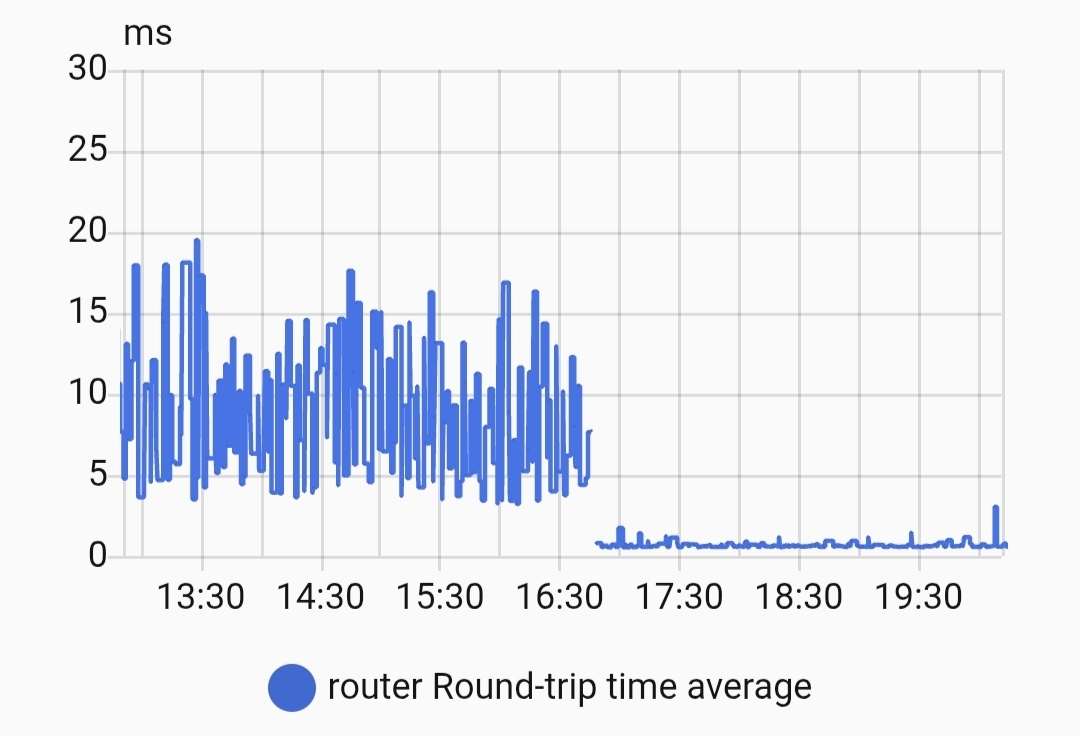
Ok, switch in the shed/office into switch in the garage, switch in the garage into powerline to switch by the router.
Run cable from the garage to the switch by the router and remove 1 of 3 powerline plugs, so yeah just removing a single plug helps so much
Okay yes, but tell that to 15 year old me who was absolutely AMAZED that you could just… Route the Ethernet through the electricity, frickin magic
I mean, that still is dope as heck.
When I first found them, I took was amazed you could use mains wiring to network. I used them to get internet on the second floor on the opposite side of the house, worked great at the time.
They worked here on a single ring, but crossing 2 consumer units seems to have killed it
Not surprised, as we were getting higher speeds the Ethernet wire also was upgraded. The electrical wires were never set up with data transfer in mind + you might get additional interferences from other devices plugged in.
So it probably needs to retransmit packets frequently.
If you use these powerline plugs, your house is also a huge antenna.
My internet access dropped occasionally until a telcom guy found the culprit. It was a neighbor using a Devolo powerlan adapter.
So yes, don’t use these. The only useful frequency in power cables is 50 or 60 Hz.
I’ve heard of power over Ethernet (PoE for IP cams) but not Ethernet over power.
Yup, there is also Ethernet over coaxial cable TV.
It’s kinda niche, especially with improvements in WiFi over the years.
I thought HDMI to Ethernet to HDMI was cool the first time we had to do it for a project in a large room. Hdmi starts running into issues at around 25-50ft. You can go a lot further with the Ethernet cable
What’s the ping? Max time to reach any device?
I use it to get to my basement of a multi story dwelling I rent in. From 3rd floor to basement is such a lifesaver
ping times have gone from 2ms and up to under 1ms, but thats how I got into them was to get internet from ground floor to second floor
Fun true story. I tried EoP when I moved into my townhome to feed Ethernet to my TV. For like 6 months I get weird issues where my TV would stop letting me connect from my phone.
Trying to diagnose it, I started disconnecting stuff. Finally, I had a single EoP plugged into wall and nothing else. Still had Internet, WTF …
Turns out one of my neighbors also has EoP and I was connecting to his network. Crazy shit
Went to MoCA after that.
I once replaced a cheap pair of adapters with a more expensive pair. Was night and day for my network stability. I know it’s hit or miss, depending on your wiring and location. But the adapters themselves can differ.
Homeplug is a defunct standard that had some real limitations, Ethernet over Power is a generic term relates to any standard of network over power lines.
The G.hn powerline standard is a massive improvement (despite being almost as old and is closer to MoCA as it will actually work over coax and other copper wiring, not just power lines) for both performance and stability, but the Homeplug standards have probably ruined the public perception.
G.hn is also a bit weird because the Wikipedia page presents it as how carriers could use, not as a home network option, even though a few home pieces of equipment are available, such as the TP-Link Deco PX50 which uses G.hn for the wifi backhaul.
you’re referring to the POE (Power over Ethernet) plugs?
I never knew they would cause such problems, maybe it was just that specific brand?
Powerline communication uses adapters to transmit network signals over existing electrical wiring, avoiding the need for new CAT6 cables and offering a hardwired internet connection in hard-to-reach areas where running Ethernet is difficult or impossible (or where the house owner simply is too lazy).
Yep, too lazy to run ethernet
Not POE, the opposite. Ethernet over power, powerline?
They were called homeplug at 1 point
Those plugs were awful for me. I replaced them with a wifi extender and it changed my life.
I think they mean powerline adapters
Yes powerline, they were called homeplugs at 1 point
Still are, but I guess a lot of people don’t know much about them
I love my EoP but yes, it’s a big noisy bus. Ok for small checkins and pings etc. like wifi every device on the bus takes a time slot away from another. I do want to see what my electrical upgrade from old wires to thicker gauge inside of grounded EMT does for it though.